Installation on an ultra.cc seedbox
Ultra.cc does not allow sudo, so a few extra steps are needed compared to a regular Linux box.
The bot requires Python 3.10 minimum (recommended: up to 3.12 — newer versions are still too recent for some libraries).
pyenv comes preinstalled on ultra.cc and we'll use it to install Python. One catch: pyenv does not install sqlite3, which the bot uses as a cache for screenshots and tracker searches. So we need to build sqlite3 first (a couple of commands), then install Python 3.12.
1. Install sqlite3
Without sudo we have to compile it. Go to your home:
cd ~
Download the package:
wget https://sqlite.org/2026/sqlite-autoconf-3510300.tar.gz
Unpack it:
tar xvf sqlite-autoconf-3510300.tar.gz
Enter the folder you just unpacked:
cd sqlite-autoconf-3510300
Run these three commands one after the other:
./configure --prefix=$HOME/sqlite
make
make install
Set the environment variables for this session only — copy and paste into the SSH terminal:
export PATH=$HOME/sqlite/bin:$PATH
export LDFLAGS="-L$HOME/sqlite/lib"
export CPPFLAGS="-I$HOME/sqlite/include"
export PKG_CONFIG_PATH="$HOME/sqlite/lib/pkgconfig"
export PYTHON_CONFIGURE_OPTS="--enable-loadable-sqlite-extensions"
export LD_LIBRARY_PATH=$HOME/sqlite/lib:$LD_LIBRARY_PATH
2. Install Python 3.12
pyenv install -f 3.12.0
Set Python 3.12 as the default version:
pyenv global 3.12.0
3. Install and test the bot
pip install unit3dup
Launch the bot as a first test:
unit3dup
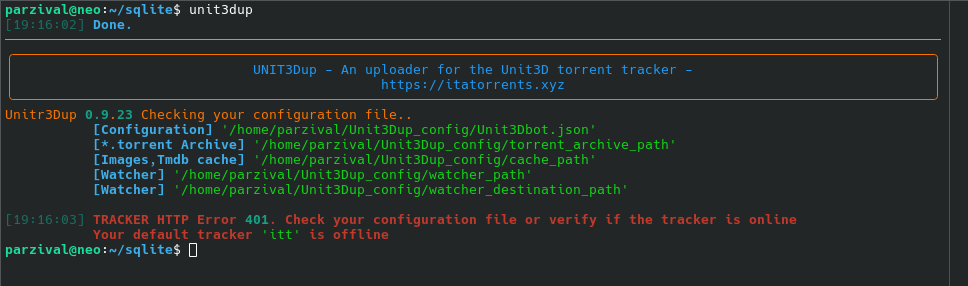
The red messages warn you that the bot is not configured yet: continue with the minimal configuration.
If pyenv is missing
Run in the terminal:
curl -fsSL https://pyenv.run | bash
Full instructions on the pyenv GitHub page.